oTree Crash Course
Session V - oTree Introduction & Individual Experiments
IMPRS Be Smart Summer School
2023-08-08
Check oTree in action:
experiment.lol
oTree Introduction
About oTree

- oTree is a platform/software to run lab/online experiments.
- Participants interact with each other using their browsers
- oTree runs on a web server:
- It runs on your computer for development
- It may run on a physical server
- It may run on a cloud server

About oTree (2)
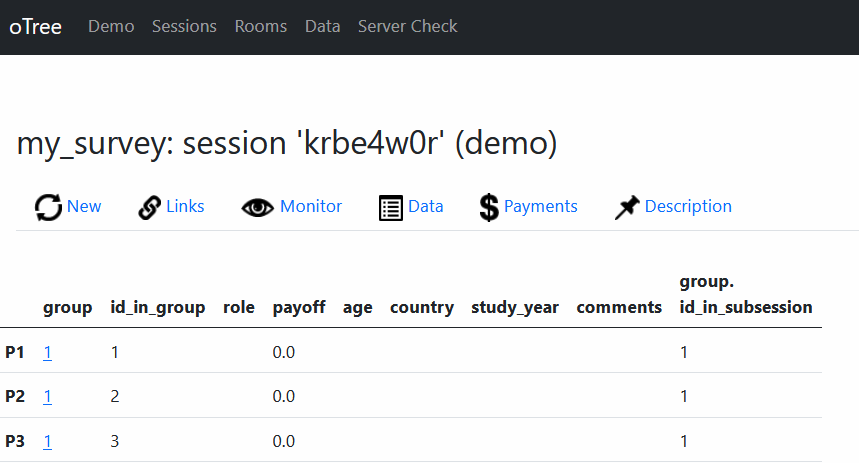
- It essentially works as a “web-app”
- oTree handles necessary components like database, pages, urls, …
- Defines a specialized data structure for our needs
- Players
- Groups
- Session
Managing your experiment
Ways to build your experiment
Using a text editor
oTree studio (https://www.otreehub.com/)
What do you need?
- A Python 3 installation
- A text editor/IDE to develop Python
- Visual Studio Code (preferred)
- PyCharm
- RStudio
- Notepad++
- Even notepad
- A command-line interface
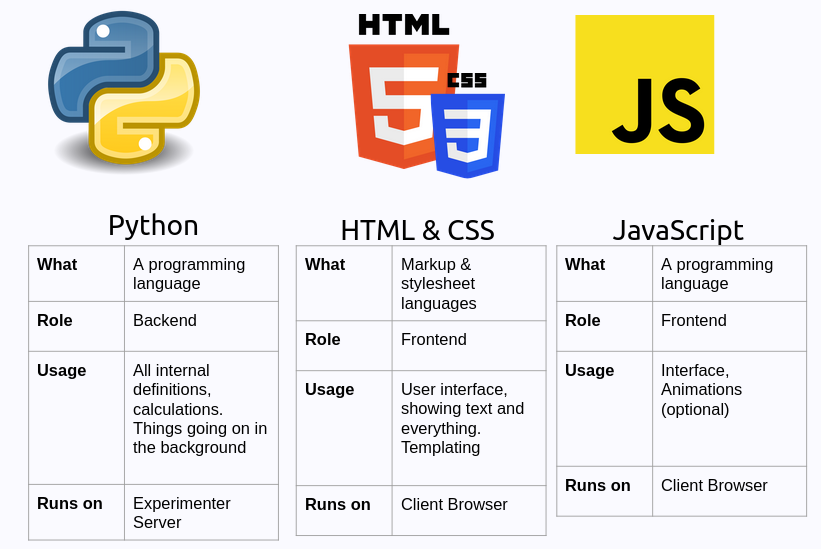
Components of an oTree Experiment
Virtual Environments in Python
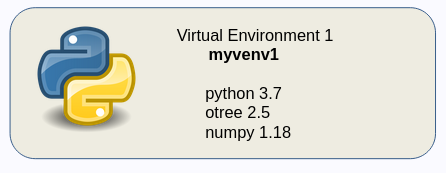
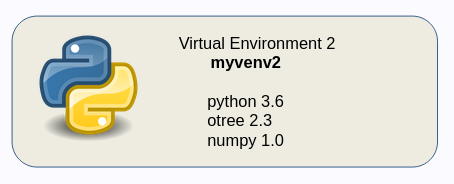
- A virtual environment is essentially a directory that contains:
- Python installation
- A number of additional packages
- They provide isolated python development enviromens with different packages and dependencies.
oTree Development Installation Structure
(my suggestion)
ot (or your project name)
├── oTree
│   ├── app1
│   ├── app2
│   ├── ...
└── venvot: A container folderoTree: oTree software (project folder)venv: Virtual Environment
oTree Installation
- Create the parent folder
ot
- Go to the folder
- Create a virtual enviroment
- Activate the virtual environment
oTree Installation
Command Line Mini Cheatsheet
| Command | Windows | MacOS/Linux |
|---|---|---|
| print current location | pwd |
cd |
| list files here | dir |
ls |
| go to directory | cd NAME |
cd NAME |
| create directory | mkdir NAME |
mkdir NAME |
| delete file | del filename |
rm filename |
| activate virtual env. | PATH\Scripts\activate |
source PATH\bin\activate |
| deactivate virtual env. | deactivate |
deactivate |
| run oTree server (dev.) | otree devserver |
otree devserver |
| create app | otree startapp APPNAME |
otree startapp APPNAME |
oTree Interface
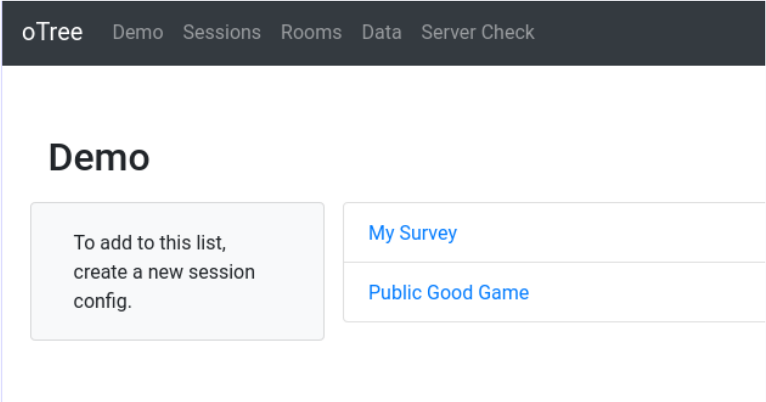
- Demo: A quick way to test experiments
- Sessions: To create and manage sessions
- Rooms: A tool to run experiments on specific links with specific participants
- Data: To download data (all together)
- Server check: Shows a summery of server configuration
What is an app?
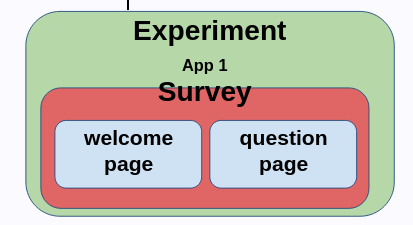
What is an app (cont’d)?
- App is the basic unit of an experiment.
- Each experiment should consist at least one app.
- Each app has its own:
- Pages
- Fields/data structure for participant
- Other components like images, csv files etc.
- …
What is an app?
- Experiments may contain more than one app
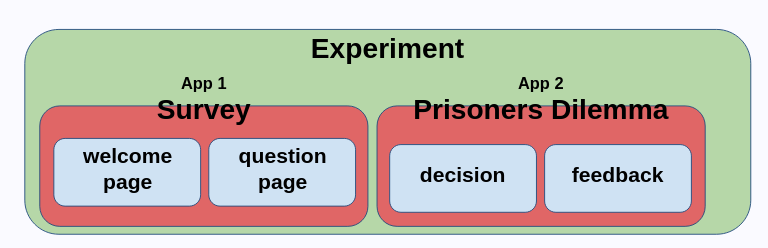
Create blank app and register it
Make sure you have your virtual environment activated
Make sure you are in the
oTree(project) folderCreate the app
In our case we will use the name
my_survey:
Register the app in the project
Go to
settings.pyModify
SESSION_CONFIGSas below
oTree File Structure
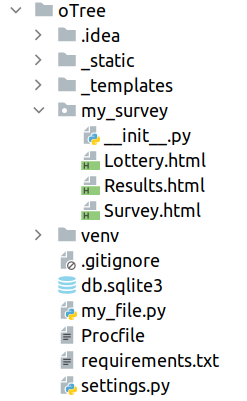
settings.py: oTree settings filemy_surveyfolder: the app in our oTree project. We apps on our own.__init__.py: Backend components (pages and models)*.html: Frontend components (templates)
How __init__.py looks like?
oTree Structure
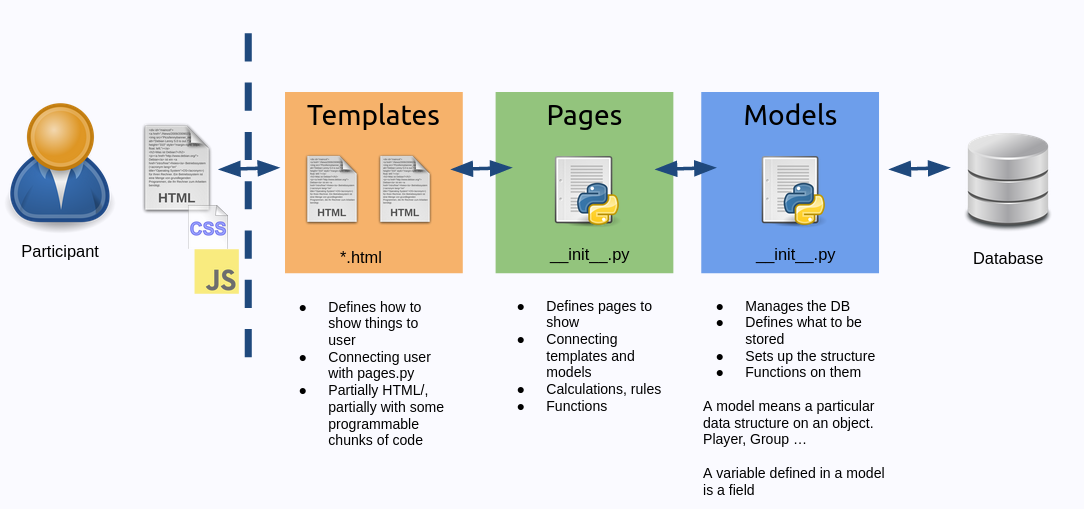
Individual Decisions: Building a survey
Survey
The simplest experiment is a survey experiment
We ask some questions and collect the answers
Usually we only need only
PlayerandConstantsclasses
Let create a survey
- We would like to ask following questions:
- Name (
name) - Age (
age) - Continent you live in (
continent) - Enjoyment level (1-5) (
enjoyment) - Further Comments (
comments)
- Name (
Things to do to create a survey (very briefly)
(Assume we created the project and the app)
- Create data structure (models in
__init__.py) - Create page classes (pages in
__init__.py) - Create HTML *templates for each page (in HTML files)
- Add the pages to
page_sequence(in__init__.py)
Things to do to create a survey (more detailed)
- Step 1 - Implement your data structure by adding fields to
Playermodel (in__init__.pyin app folder)- Every question you ask should be a field (if not more than one)
- Step 2 - Create Page classes (in
__init__.pyin app folder)- Each page is represented by a class
- This class manages the page logic, and calculations
- Define which field you want to ask in a form in each page
- Step 3 - Create HTML templates for each page (in HTML files in app folder)
- These templates are rendered by the page classes
- Step 4 - Add the pages to
page_sequence(in__init__.pyin app folder)- This is the order of the pages in the experiment
Creating Fields in our models
| Variable | Field Type |
|---|---|
name |
StringField |
age |
IntegerField |
continent |
StringField |
enyjoyment |
IntegerField |
comments |
LongStringField |
- Each field will be defined under
Playerclass
Fields
- Fields create the data structure to record the data. They can be thought as “columns” in a spreadsheet.
- They are placed in Player or Group classes in
__init__.py - You can create a field for form input, or to save the data without an explicit input
Fields (cont’d)
| Field Name | What for? | Example |
|---|---|---|
| StringField | Short text, Categories | department = Models.StingField() |
| IntegerField | Integer (whole numbers) | age = Models.IntegerField() |
| FloatField | Decimals | percentage = Models.FloatField() |
| BooleanField | True or False | is_dictator = Models.BooleanField() |
| CurrencyField | Numbers in currency format | earned_stage1 = Models.CurrencyField() |
| LongStringField | Long test | diary_entry = Models.LongStringField() |
Some field options
label: The label of the field
minandmax: The minimum and maximum values for the field
blank: Empty field allowed or not
initial: Default value for the field
choices: Multiple choices for the field
Creating Pages
| Page | Description |
|---|---|
Survey |
Survey questions |
Results |
Feedback. Thanks etc |
- Each page will have a
- Class in
__init__.py - They should be added to
page_sequencelist - Will have a
htmltemplate in the same folder
- Class in
Creating Templates
- We will modify the default template
Template Syntax
Templates use HTML codes, and oTree template items (indicated by
{{ }}).Indentation is not important in templates.
oTree has two default blocks:
{{ block title }}, and{{ block content }}You can reach variables of the player with
{{ player.variablename }}You can have conditional content by
{{ if CONDITION }}
Conditional Content in Templates
Conditional Content in Templates: Example
Individual Decisions: Building an interactive experiment
Risky Choice
Now we will build a simple interactive experiment.
We will ask participants two options:
- Take the safe option (and get 5 points for sure)
- Take the risky option (and get 10 points with 50% chance, and 0 points with 50% chance)
Pages
| Page | Description |
|---|---|
Choice |
Choice between risky and safe options |
Results |
Feedback. Thanks etc |
Data Structure
| Variable | Description |
|---|---|
wants_risky |
Whether the player wants the risky option or not |
is_lucky |
If the player won the lottery or not |
Data Structure (cont’d)
| Variable | Place | Type |
|---|---|---|
wants_risky |
Player class |
BooleanField() |
is_lucky |
Player class |
BooleanField |
RISKY_PAYOFF |
C class (Constants) |
integer |
SAFE_PAYOFF |
C class (Constants) |
integer |
Implementation
Let’s implement those at first. We will deal later with the payoffs.
Setting payoffs
- It is common to define a function to set payoffs.
- We can call it whatever we want but
set_payoffsis a common name. - This function will be written in the top level (as opposed to a method of a class)
- It should take
playerobject as input and set the payoffs of the player. - We should call this function at some point.
Modifying player fields
- We can modify the fields of the player object by using
player.fieldname - We should make sure we give the right type of input to the field
- oTree already has a built in attribute
player.payoffwhich we can use to set the payoff of the player - It is a currency field, but we can also give it an integer value (it will be converted to currency automatically)
Setting payoffs
Triggering the payoff function
We need to call the
set_payoffsfunction at some point.One option is to call it at the end of the
Choicepage.We can do this by using the
before_next_page()function (method).This can defined in the
Choiceclass. If it is defined, it will be called before the next page is loaded.It takes two arguments:
playerandtimeout_happened
Finishing the template Results.html
Remember that we can conditionally show participants different content.
Conditionally showing content
{{ if player.wants_risky_choice }}
You chose the risky option
{{ else }}
  You chose the safe option
{{ endif }}